
Table of Contents
ChatGPT Ads: The Future of Advertising Just Got Smarter
Let’s make something clear up front — we’re watching one of the biggest shifts in digital marketing since the launch of Google Ads.
ChatGPT ads aren’t science fiction or some distant “maybe one day” idea. They’re here, quietly unfolding inside Microsoft’s ecosystem — and if you’re paying attention, you already know the brands who move first will win big. Competitors are already leveraging these new ad formats to gain an edge, and analyzing and outperforming competitors is key to success.
Here’s the bold truth: the way people search, discover, and buy is changing forever. And it’s happening inside chat. This shift presents a major opportunity for brands in Canada to establish themselves as leaders in this emerging space.
People aren’t just typing keywords anymore. They’re asking full questions. They’re using natural language. And instead of scrolling through a page of blue links, they’re expecting one smart, conversational answer — with your brand either in it… or invisible.
That’s why now is the time to understand ChatGPT ads — what they are, where they live, how to get started, and how to make sure your business is ready. Adopting ChatGPT ads early can help your brand grow its reach and business in a rapidly evolving landscape.
3 Questions You Might Be Asking
- What exactly are ChatGPT ads and how do they work?
- How do I start advertising in ChatGPT or Microsoft’s Copilot chat?
- What are the best practices to make sure my ads actually perform?
If you’ve asked yourself any of these questions (or you’re hearing this buzz and wondering what’s real), you’re in the right place. I’m going to break down everything we know, what’s coming next, and a step-by-step plan to get started right now.
ChatGPT Ads: What’s Really Happening (No Hype, Just Facts)
Here’s the simple version: OpenAI is testing ad placements directly inside ChatGPT, while Microsoft — which owns a large stake in OpenAI — is already integrating sponsored listings and AI-enhanced ad experiences inside Bing’s chat product, now branded as Copilot. The advanced technology behind these platforms enables smarter ad placements, helping advertisers optimize their campaigns and maintain better control over their budgets.
In other words, the future “ChatGPT ads” everyone’s talking about are starting inside Microsoft’s advertising network.
Microsoft has confirmed that:
- Copilot chat experiences can display ads directly inside AI answers.
- Microsoft Ads accounts are being integrated with Copilot ad placements automatically when eligible.
- Advertisers who already run on Microsoft (Bing, Edge, etc.) are beginning to see “chat inventory” traffic — and the early numbers are impressive.
According to Microsoft, Copilot placements are showing up to 69% higher click-through rates and 76% better conversion rates compared to traditional lower-funnel search ads. That’s a huge lift — and a clear signal that chat-based ad experiences convert because they’re contextual, relevant, and conversational. AI-driven chat ads also enhance engagement and efficiency for advertisers, making processes faster and more effective.
So while everyone is waiting for ChatGPT’s native ad platform to open to the public, the real opportunity today is inside Microsoft Advertising. By harnessing the power of search engines and AI, brands can drive better results and connect with users actively searching across major platforms. That’s where your “ChatGPT-style” reach starts — right now.
Quick Start: “ChatGPT Ads” via Microsoft Advertising (Bing/Copilot)
If you want your brand to appear inside conversational AI results today, this is how you do it.
Start by creating a Microsoft Advertising account. Advertisers can choose from various campaign types and placements to tailor their strategy for maximum impact.
Set up your conversion goals, making sure to track key actions such as purchases, sign-ups, and other valuable events.
Upload your images, logos, and product feeds. You can also manage downloads of creative assets or reports within the platform for easier tracking and optimization.
Expand your reach by targeting new audiences and promoting your app to increase app installations through Microsoft Advertising.
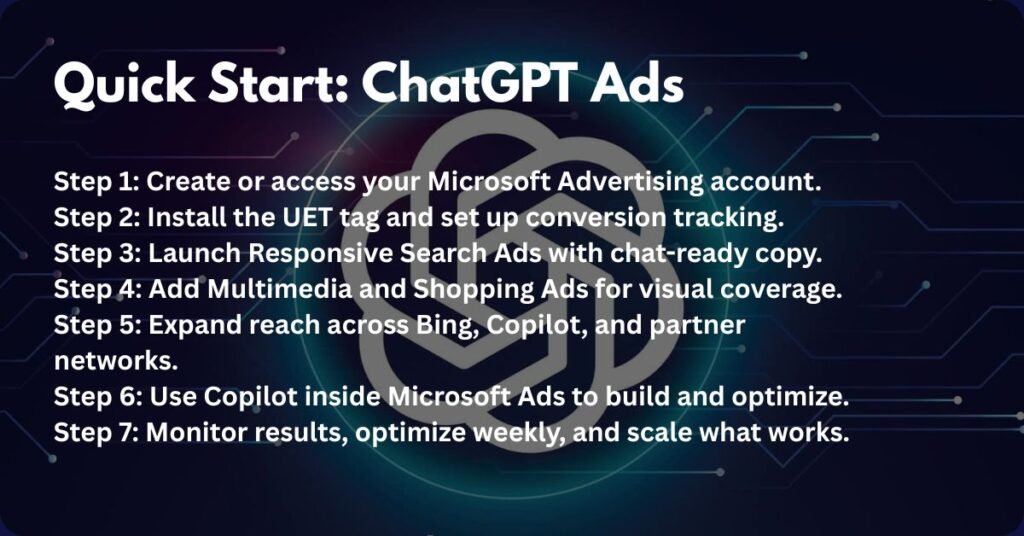
Step 1: Create or Access Your Microsoft Advertising Account
If you already manage clients or multiple businesses, use your Microsoft Advertising Manager Account (MCC). If not, just create a standard account at ads.microsoft.com, set your billing, and confirm your payment settings.
Step 2: Install the UET Tag and Set Up Conversions
This is critical. The UET (Universal Event Tracking) tag tracks what happens after someone clicks your ad — page visits, leads, sales, etc.
- Add it to your website (via your site’s header or tag manager).
- Create conversion goals inside Microsoft Ads (lead form submissions, purchases, calls, etc.).
- If you’re B2B, import offline conversions (qualified leads or booked calls) to train the algorithm around real results, not just clicks.
Step 3: Launch Search Campaigns with Chat-Ready Copy
Start with Responsive Search Ads (RSAs) — they’re flexible, automatically optimized, and supported in Copilot’s conversational inventory.
When writing headlines and descriptions:
- Answer the question directly.
- Use natural, conversational language.
- Add credibility — numbers, stats, proof points, or recognizable brand details.
- Keep it short, clear, and helpful.
Example:
“Need an Event Venue in Miami? Compare 3 Spaces with Live Availability.”
That line feels like an answer, not an ad — exactly what Copilot and ChatGPT prefer.
Step 4: Add Multimedia and Shopping Ads
Microsoft’s Multimedia Ads combine text and imagery, and they show prominently in chat and search results. If you sell products, set up your Merchant Center feed and run Shopping Ads too — these feed-driven listings are already showing in Copilot visual results.
Step 5: Expand Your Reach
Ensure your campaigns are eligible for:
- Microsoft sites (Bing, Copilot, Edge)
- Microsoft’s network partners (DuckDuckGo, AOL, Yahoo)
- Conversational placements (Copilot chat)
More coverage = more data = faster learning.
Step 6: Use Microsoft’s Copilot Inside the Ads Platform
Here’s the meta part: Microsoft now includes Copilot directly inside your ad account. It helps write headlines, analyze performance, and suggest optimizations — all using your data.
Use it. Ask questions like:
“Which ads have the highest CTR this week?”
“Write 3 new variations for my top ad group focused on event planners.”
You’ll get solid starting points to refine manually.
Step 7: Optimize and Scale
Once your data builds:
- Switch to Maximize Conversions or Target CPA/ROAS bidding.
- Review search term reports weekly — add negatives, tighten themes.
- Keep rotating new copy — Copilot loves fresh, relevant creative.
Your paid ads are only as effective as the landing pages they lead to—because clicks don’t convert if your page doesn’t deliver. If you’re not familiar with what makes a high-performing landing page, read this next: 7 Things You Must Fix On Your Landing Pages Before Running Paid Ads (2025 Edition).

Crafting Ads That Work in Chat Environments
Advertising in conversational AI isn’t like writing for search. The tone and intent are different. Effective chat ads can bring a brand or product to life by using engaging content that captures attention and enhances brand presence.
Here’s what works:
1. Lead With the Answer
People are asking full questions. Your ad has to sound like the answer they were looking for.
Instead of: “Award-Winning Marketing Agency | Book a Consultation”
Try: “Looking for a Marketing Agency That Actually Gets Results? Let’s Talk.”
2. Be Visually Ready
Upload your logo, images, and videos.
Multimedia Ads and visual extensions get more placement opportunities in Copilot chat.
3. Highlight What Sets You Apart
Copilot’s Compare & Decide feature pulls in product details, pricing, and ratings.
Make sure your data feeds, pricing, and structured markup are complete so you can appear when users compare options.
4. Use Proof
Reviews, case studies, certifications, awards — anything that builds trust.
AI chat interfaces favor credible, verifiable info.
5. Keep It Conversational
Avoid corporate buzzwords. Talk like a human — clear, helpful, a little punchy.
The 25 Best ChatGPT Prompts for Email Marketing (Updated for 2025!)
Campaign Setup: Simple, Scalable, Smart
Keep your structure lean so it’s easy to manage and optimize.
- Core Search Campaigns: Organized by intent (Problem, Consideration, Brand).
- Audience Layers: Add in-market audiences, remarketing, and customer lists.
- Shopping Campaigns: If you sell online, sync your product feed and group by profit margin or bestsellers.
- Brand + Non-Brand Split: Protect your name with a brand campaign; use non-brand to attract new customers.
This structure gives you clarity on what’s driving results — and makes scaling simple.
Measuring Results (and Proving It Works)
If you’re testing this for the first time, start with clear metrics that actually matter:
- Click-Through Rate (CTR): Measure engagement.
- Conversion Rate (CVR): Are your visitors taking action?
- Cost per Conversion (CPA): Is it profitable?
- Revenue or ROAS: Are you earning enough return to scale?
Appearing in search engines is crucial for driving targeted traffic and sales, as these platforms connect your ads with users actively searching for your products or services.
Microsoft’s internal data suggests Copilot experiences deliver up to 70% higher CTR and conversion rates versus traditional search — but you’ll only know if that holds true in your vertical once you track it yourself.
Add UTM tracking to every ad. Connect Microsoft Ads with your CRM or analytics platform so you can attribute leads and sales accurately. Import offline conversions (like qualified calls or deals closed) to make your bidding smarter. Leveraging search help can improve your visibility and drive more leads and sales by ensuring your business appears where consumers are actively searching.
Budgeting and Cost Control
Smart budgeting and cost control are the backbone of any successful ChatGPT ads advertising campaign. Both Google Ads and Microsoft Advertising provide powerful tools to help advertisers manage their investment, optimize performance, and maximize sales without overspending. With features like automated budget optimization in Google Ads, you can let the platform allocate your budget to the highest-performing ads and campaigns, ensuring you get the most conversions for your spend.
Microsoft Advertising offers flexible bidding strategies, including cost-per-click (CPC) and cost-per-acquisition (CPA) options, so you can set clear budget limits and control how much you pay for each lead or sale. Advertisers can create campaigns with daily or monthly budgets, monitor spend in real time, and adjust as needed to stay on track.
Additionally, both platforms provide detailed data and insights, allowing you to analyze campaign performance, identify what’s working, and make informed decisions to optimize your budget. By regularly reviewing these insights, you can refine your campaigns, improve conversion rates, and ensure your advertising investment continues to deliver strong results. The combination of smart budgeting tools and actionable data empowers businesses to create cost-effective campaigns that drive sales and support long-term growth.
Best Practices for 2025–2026
- Answer Intent Instantly.
If your headline doesn’t answer the searcher’s question, you’re invisible. - Pair Formats.
Run text + multimedia + shopping together. This increases your chances of surfacing in conversational and visual placements. - Optimize Weekly.
Replace underperforming copy. Review search queries. Refresh visuals. The algorithm rewards active accounts. - Use Copilot in Ads Manager.
Let it suggest ad copy and optimization ideas — but always review manually. AI drafts fast, but your voice wins trust. - Focus on First-Party Data.
Email signups, CRM lists, loyalty members — that’s the foundation for retargeting as privacy rules tighten. - Test Your Landing Pages.
The first section should mirror your ad’s promise. Chat users are high-intent — they want the answer now.
Your ads, content, and automations are just one part of a much bigger picture—your overall digital marketing strategy. Without a clear plan tying it all together, even great campaigns fall flat. If you need a roadmap for how to build a strategy that actually drives results, check out Digital Marketing Strategy: A Complete Guide to Building Effective Campaigns in 2025.
Preparing for Native ChatGPT Ads
This is where it gets exciting.
OpenAI has confirmed that ads will soon appear directly inside ChatGPT responses, starting with sponsored placements and contextual integrations. That means your brand could literally be the source ChatGPT cites when it answers a user’s question.
Here’s how to prepare now:
- Keep testing in Microsoft Ads. It’s the same ecosystem.
- Refine your Q&A-style copy. ChatGPT ads will reward natural language that matches user intent.
- Use structured data and product feeds. The cleaner your info, the easier it is for AI to “read” and surface it.
- Focus on credibility. The AI will favor sources it trusts — meaning your site content, reviews, and brand reputation matter more than ever.
Launch Checklist (Copy and Paste)
- ✅ Create your Microsoft Ads account and confirm billing.
- ✅ Add the UET tag sitewide and define your conversion goals.
- ✅ Build one RSA campaign with Q&A-style ad copy.
- ✅ Upload images, logos, and product feeds if applicable.
- ✅ Enable automated bidding (Maximize Conversions).
- ✅ Use Copilot in Ads Manager to generate and test new creatives.
- ✅ Add UTMs, connect CRM tracking, and import offline conversions.
- ✅ Review performance weekly and refresh your best assets.
Mobile Advertising Opportunities
Mobile advertising is no longer optional—it’s essential for any brand looking to connect with users where they spend most of their time. With the majority of internet traffic now coming from mobile devices, mobile apps and mobile-optimized websites have become prime real estate for advertisers. Both Google Ads and Microsoft Advertising offer robust solutions to help businesses reach their audience on-the-go, whether they’re browsing, shopping, or searching for services.
Advertisers can leverage personalized advertising to deliver tailored messages that resonate with users in real time. Search ads and display ads can be strategically placed within mobile apps and across mobile websites, ensuring your brand is visible at the right time and in the right context. For example, with Google Ads, you can create campaigns specifically designed for mobile devices, targeting users based on their location, interests, and behaviors to drive sales and boost conversions.
Microsoft Advertising also enables brands to connect with audiences through mobile placements, offering options to display ads within apps and on mobile-friendly sites. By tapping into these mobile advertising opportunities, businesses can increase brand awareness, engage users at critical moments, and ultimately drive more sales. The key is to create campaigns that are optimized for mobile—using concise copy, compelling visuals, and clear calls to action—to ensure your ads stand out and deliver results.
FAQ: ChatGPT Ads and Copilot Advertising
Q: What exactly are ChatGPT ads and how do they work?
A: ChatGPT ads are emerging sponsored placements inside OpenAI’s ChatGPT platform. Currently, most “ChatGPT-style” ads appear in Microsoft Copilot — Bing’s AI-powered chat — through Microsoft Advertising. They blend seamlessly into conversational answers, giving users relevant recommendations.
Q: How do I start advertising in ChatGPT or Copilot chat?
A: The easiest way to get started today is by running Microsoft Advertising campaigns with Responsive Search Ads and Multimedia Ads. Install your UET tag, create your campaigns, and opt into Microsoft’s network distribution. This makes your ads eligible for chat and Copilot placements automatically.
Q: Where do my ads appear when I use Microsoft Advertising for ChatGPT or Copilot?
A: Your ads can appear in Microsoft Copilot, Bing, and across the Microsoft Advertising network, including platforms like MSN, Outlook, and Microsoft Edge.
Q: Are there any free features or trials available for advertisers starting with ChatGPT or Copilot ads?
A: Microsoft Advertising often provides free trials, promotional credits, or free access to certain features for new advertisers. Check the Microsoft Advertising site for current offers and free resources to help you get started at no additional cost.
Q: How are refunds processed if I need to cancel my ad campaign?
A: Refunds are processed according to Microsoft Advertising’s policies. The time it takes for a refund to appear in your account depends on your bank and its processing times.
Q: How can I follow up with audiences or use remarketing strategies within the ChatGPT and Copilot ad ecosystem?
A: You can use Microsoft Advertising’s remarketing tools to follow up with users who have previously engaged with your ads. This allows you to build ongoing relationships, reinforce brand awareness, and drive conversions by targeting audiences across the Microsoft network, including chat and Copilot placements.
Q: What are the best practices to make sure my ads perform well?
A: Write conversational, answer-first copy. Lead with value, not slogans. Use visuals. Keep your landing pages fast and focused. And optimize every week — because chat-based ads evolve quickly, and fresh creative keeps you visible.
Final Word
AI-driven chat is the next frontier of search — and it’s happening right now.
While everyone else is waiting for ChatGPT’s ad platform to officially launch, smart marketers are already showing up in those conversations through Microsoft Copilot.
Get in early. Learn how the chat ecosystem behaves. Refine your copy. Test your assets.
Because the brands who figure this out first? They’ll own the new conversation.
Want to know more? Visit our Lead Generation Services page to discover how we can drive higher quality leads that convert into real revenue!


